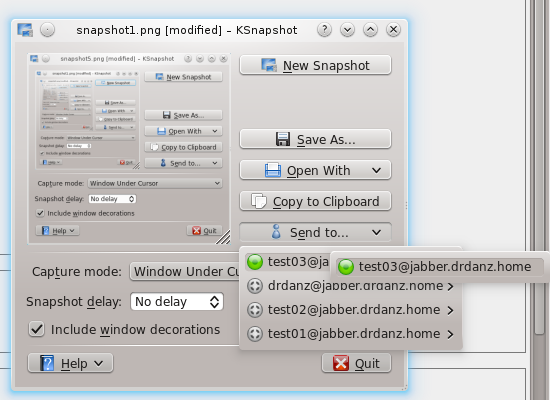
This wasn’t in my project, but I thought it would be useful…
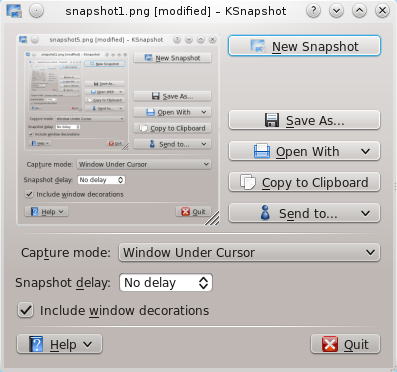
When I’m chatting with someone, I often need to send him screenshots, so the “standard procedure” is to hit printscreen (KSnapshot pops up), save the file, open Kopete, find contact, right click, send file, locate the file on my file system… That’s boring! What about a “Send to…” menu in KSnapshot?
Easy done using KTelepathy


Planet KDE


You sir, is awesome. Thanks for making the world better using KDE.
This feature can be simply but it’s make KDE kick mores ass.
Very nice – the functionality as well as the integration into the day-to-day apps
Any plans when this functionality will go upstream into a main release?
I’d like to be able to chat first, then send emails. Kopete is maybe together with konqueror the most “love-lacking” application.
Amazing! This feature is so useful and required. Keep the good work.
my workflow is more like: create a snapshot, drag it to the pastebin applet. still this goes one step further by sending it directly to someone, which is pretty nice.
my concern here is two-fold: it would be nice to have this anywhere i have some data to share. having a “share” spot, e.g. on the desktop, which can be used to drop things on or have things sent to with a “Share…” button in the app would be nice to keep it centralized and consistent.
which relates to the second issue i have: we’re back to a button explosion in ksnapshot with this feature.
perhaps “Open” and “Send” could be combined into one button/menu?
that said, this is a very cool feature and one that deserves to be seen in many places, ksnapshot included! very cool stuff …
KDE’s IM features finally surpass Windows/Mac’s IM features. sweet
Will we have Telepathy clients for SC 4.6? That’s awesome. Waiting for the incoming messages Plasmoid in a GNOME-Shell style
.
I wish that someone from kopete maintainers would fix it so you can drop the file to the user name in userlist or then to the open message window. Why I remember that was the case in KDE 3.x series but now in KDE SC it is gone?
I must say that I dont like about adding a new button just for the IM application. There have not been allowed to have pastebin or email buttons neither to keep the UI minimalistic. And even that I send sometimes screenshots to my friends, I never do it trough IM because you never know where they are (mobile/laptop/desktop) and can they receive the file. Like older kopete versions does not support MSN file transferr and they definetly does not use any empathy clients so this is useless for me
ps. Take the kopete online or the IM icon for the button.
“I wish that someone from kopete maintainers”
As far as I can tell, there’s no such thing
If we are going like this… we’ll see KMess reengineered to do anything Telepathy-related.
I’m dreaming a telepathy plugin in all KDE SC apps…
Thanks for this work on kSnapshot: it’s very useful for me!!
I’d like to see a blogpost/webpage on what ktelepathy actually provides. I’ve been looking for my telepathy work, and am a bit confused. Especially with the whole nepomuk integration side.
I like what you’ve done though
Dave
Way too cool! This is a brilliant idea; thanks a ton for the implementation
Wow, 13 comments in less then 24 hours! This is record for my blog!
Thanks!
@liquidat
We are planning to release something in KDE 4.6, I don’t know if DBusTubes will be there because of a Qt patch required, but I think we’ll be adding file transfer support, so it could probably be there.
Anyway, we are planning a telepathy sprint in September where we’ll decide a lot of things!
But I think this particular feature depends on KSnapshot maintainers, i will send a patch when we will have a real library
@manolin @Aaron Seigo @Fri13
George (grundleborg) is working on a pluggable library that will allow to do something similar, for example you could share a file with something and the library will automatically choose the best/favorite method (i.e. mail if the contact is offline, IM if the contact is online etc).
So instead of having “Telepathy Contacts” we could have a single “Share” button with all contacts and maybe other pluggable extensions
But we will have to wait for that…
@David Edmundson
I would like to see it too…
But it’s a little ugly at the moment and many things are to change, so I’ll wait some more for a post!
Anyway at the moment we have:
* A model representing your contact list
* A few jobs to do various stuff
And we will have soon:
* Some filters to manipulate your contact list model (group contacts, filter by online/offline status)
* Some cool widgets using the model (like the menu in the screenshots)
* More jobs
Some of this stuff is on svn, some is im my git repository, some in my laptop so if you want to use them or if you need help, just ping me on #kde-telepathy
One comment: context awareness! Would it be reasonable only to show this button if you are online already? How does it work if you’re offline, or online but no messenger is available, etc…
Cheers
@Troy Unrau
That’s definitely a good idea and shouldn’t be hard to do, but I don’t have time right now… I’ll work on this after the summer of code!